Model Management
The Vehicle Model Management module allows administrators to create and manage vehicle models associated with specific vehicle brands and vehicle types within the Drivo platform.
This module helps maintain organized vehicle data for Ride Sharing, Delivery, and Bag Sharing services.
Vehicle Model List
The Vehicle Model List displays all registered vehicle models in a structured table format.
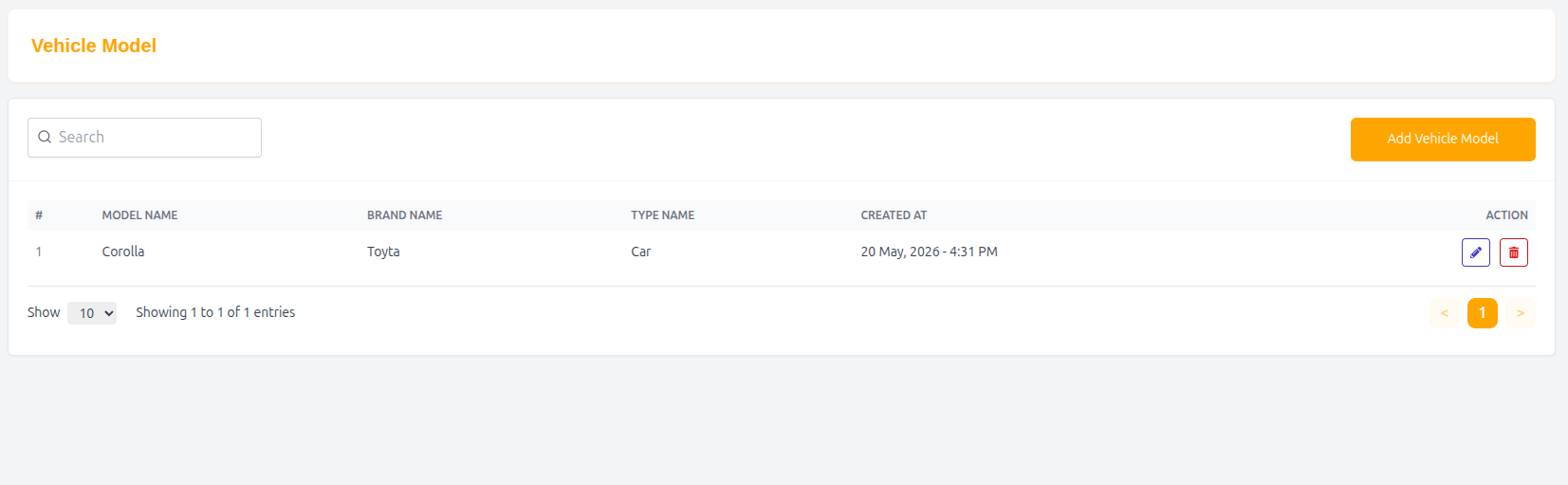
Features
- Search vehicle models
- Add new vehicle models
- Associate models with vehicle brands and types
- Edit or update existing model information
- Maintain organized transportation data
Table Structure
| Column | Description |
|---|---|
| # | Serial number |
| Model Name | Name of the vehicle model |
| Brand Name | Associated vehicle brand |
| Type Name | Associated vehicle type |
| Created At | Model creation date and time |
| Action | Edit or manage model |
Example Entry
| # | Model Name | Brand Name | Type Name | Created At | Action |
|---|---|---|---|---|---|
| 1 | Corolla | Toyta | Car | 20 May, 2026 - 4:31 PM | Edit |
Add Vehicle Model
Administrators can create a new vehicle model and associate it with a vehicle brand and type.
Vehicle Model Form
Name
Enter the vehicle model name.
Example
- Corolla
Select Vehicle Type
Choose the vehicle category associated with the model.
Example Types
- Car
- Bike
- Truck
- Van
Select Vehicle Brand
Choose the brand associated with the model.
Example Brands
- Toyta
- Honda
- Nissan
- Suzuki
Submit Vehicle Model
After completing all required fields:
- Click Submit to save the vehicle model.
Why Vehicle Model Management Matters
- Organizes vehicle information accurately
- Helps drivers select correct vehicle details
- Supports proper fare and category management
- Improves transportation data consistency
- Enhances scalability and operational efficiency
Summary
The Vehicle Model Management system allows administrators to manage vehicle models efficiently by linking them with vehicle brands and types, ensuring accurate and structured vehicle records throughout the Drivo platform.